
Apple iPad Review
Since its release the iPad has taken the world by storm. Well designed, compact, solid battery life and a huge app base has made the iPad a very desirable product.
With a large colour multi-touch screen and the same iOS that’s used on the iPhone and iPod Touch this will be instantly familiar; with all the same apps plus many more specific to just the iPad.
Along with the device itself, Apple has their own ebook store; iBooks, which stocks books from many of the top publishers.
Design and Features
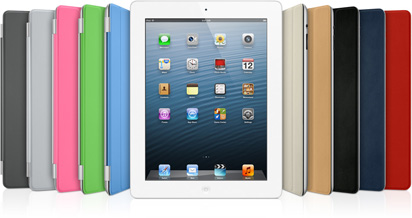
Based on the same minimalist design as the iPhone, the iPad is sturdy, sleek and compact, without too much waste beyond what’s needed for the 9.7-inch screen, which is as crisp and clear as one would expect from this type of display. Be aware, as it uses an LCD screen you’ll struggle to use it out in the park on a sunny day.
There are two iPad options; WiFi and 3G. I’ve found the WiFi model adequate 99% of the time, although I do live in a city with lots of free WiFi hotspots.
Compared to many other tablets the battery life is respectful although it cannot be compared to dedicated eReaders like the Kobo Reader and Kindle, where we normally talk about battery life in weeks not hours.
 {: .img-responsive}
{: .text-center}
{: .img-responsive}
{: .text-center}
eReader Content & Apps
At the bottom of this review is a short overview of some of the reader apps available.
The iPad comes with its own ebook reader app; iBooks, which uses EPUB as the main ebook format, although they do use their own FairPlay DRM. This means you won’t be able to buy from the iBooks store and read your purchases on non-Apple devices.
One of the big advantages of the iPad is the number of stores and publishers who’ve released their own iOS apps, which means you buy from Amazon, Kobo, B&N, etc. This is certainly one of the more positive things about using the iPad as an eReader.
Final Thoughts
Most reviews will tell how amazing the iPad is, and to a point, they’re right. For a mobile entertainment system the iPad is one of the best around. However, as an ebook reader there are many negatives, which I believe will be important to many people:
- It’s a little too heavy for one-handed use.
- Outdoor use will be limited as it doesn’t work so well in bright sunlight
- You’ll be constantly aware of how little battery life is left; 10 hours (max) isn’t a great deal.
- It’s an expensive purchase!
If you’re thinking of using one of these as a laptop replacement then you’ll need to think hard on what type of tasks you need to do; the iPad will not be a suitable replacement for many people. I consider it to be a compliment to other current gadgets.
If you have deep pockets and absolutely need features like email, web browsing, gaming and all those other apps – with only some casual reading – then the iPad will certainly be a worthwhile purchase.
eReader Apps
Apple iBooks
First up we should talk specifically about the iBooks reader.
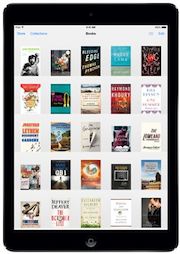
Cosmetically, iBooks is very appealing, offering a bookshelf library and a book-like display for reading. For those users who are used to the Stanza Reader on the iPhone, you’ll be a little disappointed with the lack of control over what can be done with the text and page formatting; basic font, size, justification and brightness controls only. One great feature is the built in dictionary, which is accessible by double tapping a word.
To purchase new books you just click the store button and shop like you would on the Apple App Store.
Non-DRM EPUB & PDF titles can be read on iBooks which means all the titles from epubBooks.com can be downloaded and read for free.
Amazon Kindle
After the success of their Kindle eReader, Amazon didn’t wish to lose any book sales to Apple, so they introduced their own Kindle Reader app for the iPad. Amazon has one of the largest selections of books available and as purchases can be made from many different countries around the world, this is a great choice for a lot of people.
Features in the Kindle Reader are basically the same as with iBooks, allowing the font and size of the text to be changed. There’s the addition of making the page white text on a black background, which many people do prefer. As an eReader the Kindle does the trick nicely, even if it doesn’t have too many frills.
The biggest drawback is that there’s no EPUB support, so you can only get eBooks into the app by purchasing them directly from the Amazon.
Kobo Reader
Kobo is one of the few stores from which you can buy ebooks and read them on the iPad as well as dedicated eReaders such as the Sony Reader and their own dedicated Kobo Reader. With over 2 Million titles, Kobo is second only to the Amazon Kindle as the one-stop shop.
Features on the Kobo Reader app are very similar to those of iBooks and Kindle. Like iBooks, you purchase your titles directly from within the app itself, which makes book purchasing very easy indeed.
EPUB is supported in Kobo, though you can only add titles that have been purchased directly from the Kobo Store.
Marvel Comics
Comics are not for everyone but Marvel is probably one of the most popular, and they certainly provide a wide selection of titles. The full colour display of the iPad makes the comics look fantastic and with cool reading transitions (or with regular page turns) this creates a great experience for any comic book fan.
All purchases are made directly from within the app and you can either buy individual comics or subscribe to a series; all new releases are automatically downloaded to the app.
GoodReader
GoodReader is a document reader specifically for viewing PDF, although you can view a number of other formats along with Pictures, and some Audio/Video files.
There’s no store to purchase from and you can only read DRM-free material. It is however a great PDF reader allowing you to read all kinds of work documents, computer manuals (like those that can be purchased from O’Reilly) and PDF novels, so it’s still worthy of buying–sure, this app is not free, but then it is cheap and very, very useful.
There are a great number of options available to help customise things to your own liking; page orientation, layout (single/double page) and brightness controls. One of the more interesting options is the crop feature, allowing you to remove all those white borders that often come with PDF documents.
Zinio
Zinio is an international distributor so you can get magazines from many different countries and languages. You can buy individual issues or purchase subscriptions online, or from directly within the app itself. Often you’ll receive a discount on the physical cover price.
The magazines you buy from Zinio all seem to be a direct electronic counterpart of the paper issue, so you won’t find any enhanced content. Not an especially bad thing in most cases.