
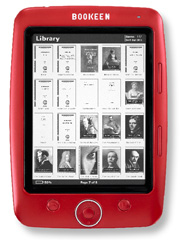
Bookeen Cybook Opus Review
Bookeen is one of the oldest eReader makers around and with the Cybook OPUS they’ve brought out one of the first 5 inch E-Ink readers, and which is also possibly the cutest on the market.
External Design Aesthetics and Features
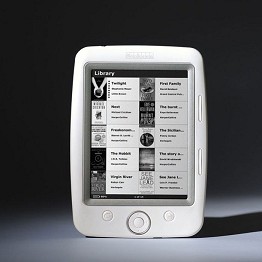
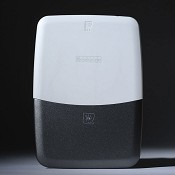
A cool ergonomic shape with nicely rounded edges and contours that blend into the lovely 5 inch screen. The casing has a very smooth, Pearl coloured finish and although made from plastic it by no means feels flimsy. The back side is made with one half in a metallic grey that acts as a battery compartment cover – the Opus looks like nothing else on the market.
 {: .img-responsive}
{: .pull-left}
{: .img-responsive}
{: .pull-left}
Buttons has been kept to a minimum, with just two for page turning, a home, menu and on/off button. There’s also a 5-way pad used for navigating menus, turning pages and selecting items – there is no touch screen.
The Opus is the first dedicated reader to come with a G-sensor accelerometer, used for motion detection, that allows for automatic screen orientation between Portrait and Landscape modes (in the same fashion as an iPhone/iPad). Although I initially thought this was a cool feature, I must admit that after the first week of use I turned it off as it was getting quite annoying.
Bookeen includes a nice chunky leather-like slip case with the reader fitting nice and snug, giving solid protection yet without adding any extra weight to the reader itself.
Core Features
Other than having a slightly smaller screen, the hardware is rather typical of other dedicated readers, the most noticeable difference is the lack of an MP3 player; in my eyes this shouldn’t be considered a negative.
- Very light and small reader; 150g / 108 x 151 x 10 mm (4.2” x 6” x 0.4”).
- 5 inch greyscale (4-levels) screen.
- 1GB of internal memory; able to hold well over a thousand books. Micro SD card slot allowing several thousand titles to be stored.
- Officially 8,000 page turns — in real life I would say 2-3 weeks of usage.
- Replaceable Battery
User Interface and Features
Running on the Boo Reader software there are two basic interface modes, list-all and folder mode, both of which are very straightforward to use. There’s no actual homepage like on the Sony, but if all your books have a front cover then the visual is very pleasant.
Unlike the Sony Touch or Amazon Kindle it’s not possible to have annotations or dictionary lookups, but then without a touch screen or keyboard these features become cumbersome to use anyway.
Text and Page Zooming
There are plenty of zoom options available and even a couple of features I’ve not seen on other devices.
The 12 Levels of font size give an amazing amount of control allowing the user to find that perfect size. On TXT and HTML documents you can also justify the text and make the font bold, which really gives a lot of extra clarity. You can also select from three different fonts; Courier New, Georgia and Verdana. For some reason though (perhaps a limitation of the Adobe software) the font style on EPUB documents cannot be changed.
Page Turning and Start-up Time
Start-up time is a little slower than with other eReaders; taking around 15 seconds. This is because the Opus doesn’t go into sleep-mode when you switch it off, but turns off completely. As a result battery life is extended, giving almost three weeks of charge.
One unique feature is that you can turn off the full page Flashing Refresh and select the ‘non flashing’ screen. Once done the text just changes rather than doing a virtual page turn, although it does leave a small amount of ghosting on the screen. I was quite surprised that there wasn’t really any noticable increase in page turn speed with this setting enabled.
Battery Life
 {: .img-responsive}
{: .pull-left}
{: .img-responsive}
{: .pull-left}
The battery life on any E-Ink based ebook reader is very good but somehow Bookeen have managed to extend this even more with the Opus. Officially you can make 8,000 page turns, in real-life terms you will have from two to three weeks of use between charges. If you connect your reader to a USB port for 15 or so minutes each week, it may last even longer – certainly one of the most efficient readers around.
The battery is fully replaceable and can be swapped out in just a couple of minutes.
Transfering content to the Reader
Content is added via a USB cable using your computers file manager or with Adobe’s Digital Editions (ADE). If you wish to read DRM ebooks then you’ll need to use Adobe Digital Editions, which is available on both Microsoft Windows and Apple Mac computers.
Note: in order to read commercial (DRM) titles you’ll need to activate your reader with Adobe; most commercial EPUB books are now using the Adobe DRM.
Free and Commercial Content
There are many different stores now selling EPUB ebooks. We have a list on the Buy EPUB ebooks resource page, or use our site’s search bar, where we include all the top online stores.
Here at epubBooks we also provide plenty of EPUB classics for free download, which you can access by selecting the ‘Free’ price option on the search pages.
Borrowing from your Local Library
For more information on how to get Library EPUB books, checkout our Blog post; Library Books & eReaders
Pros and Cons of the Bookeen Cybook OPUS
Pros
- Great looking, ergonomic design and with a 5 inch screen, this makes a very light and comfortable device to read on.
- One of the best E-Inks screens around; very bright with crisp and clear text.
- 12 font sizes and several full-page zoom functions (crop margins, fit width, fit height, etc.) that are especially useful with PDF documents.
- Comes with a great hard slip-case, giving protection to the reader while keeping the device lightweight during reading.
- Reads HTML and offers more font/layout choices for this format and Text files.
- Massive battery life, much more than other dedicated readers.
Cons
- Sometimes having only the 5 inch screen leaves you wishing for more screen real estate.
- Painfully slow start-up time — probably due to the lack of a sleep mode.
- Page turns not as snappy as other readers.
- Expensive; the cost is similar to many 6 inch sized eBook readers.
Conclusion
It was difficult to find many cons for the Cybook Opus, the only one that stood out is the price, which places the Opus on a similar level as many 6 inch readers. Okay, so perhaps the Opus is a touch expensive, but Bookeen have really packed this with a ton of great features and if nothing else, it is the cutest reader in town and I can’t see how Bookeen could have designed a better eReader…it’s really that nice!
Visit Bookeen.com for more information.