
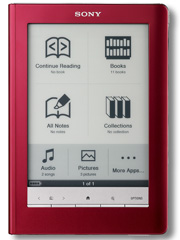
Sony Reader Touch Edition Review
Sony has been making E-Ink eReaders since before Amazon had their Kindle and they are still producing some great ebook readers and tablets. Their most popular to date has been the Touch Edition, which is a great balance between features and cost.
The Design
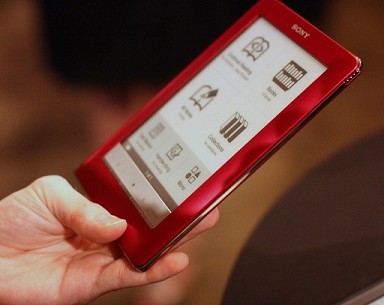
Sony has really gone to town and created a very pretty eReader, with a sturdy metal casing that provides ample protection and the non-slip, rubbery back surface, which helps give a more secure grip while reading.
Navigation is now done via a touch screen, which has allowed the number of external controls to be reduced to just five slim line buttons, that are needed for core functions such as page turning, zooming, accessing the options and a master home button.
 {: .img-responsive}
{: .pull-left}
{: .img-responsive}
{: .pull-left}
There’ been some complaints that the Touch only comes with a soft slipcase instead of proper a hard cover but I actually prefer this option as a hard cover add substantial weight to the device for only a little extra protection. Perhaps the only cause for concern is that the slipcase doesn’t have a closing flap so there’s still the possibility of the screen being scratched from hard objects like a set of keys slipping into the case.
Core Features
At its core there isn’t much in the way of ground breaking technology with the hardware; it uses the same E-Ink screen (8 levels of grey), has 512MB internal memory and boasts the same fantastic battery life (1 to 2 weeks between charges), all features found on pretty much any E-Ink reader on the market.
Touch Screen
The most noticeable feature is the addition of a touch screen from which you do all your navigating, including page turning (optional). This is fantastic, but to provide this functionality the screen itself (where the characters are displayed) is now set quite back from the top surface and this had added several issues;
- Fuzzy text, albeit only very mild.
- Slightly darker screen background compared to a regular E-Ink device.
- Extra touch surface gives off mildly more glare than a normal E-Ink screen.
- Now feels like you’re reading your book through a window.
Interaction is made with either your finger or the included stylus, although with the exception of creating drawings, your finger will usually suffice.
One cool feature that’s been heavily promoted is that “you turn pages with the swipe of a finger”. In the first week or so of use I certainly did find this very cool but once the newness had worn off, I found myself back using the physical page-turning buttons - you can’t swipe with your finger while drinking a cup of coffee and on the train!
User Interface and Features
Sony made full use of the touch screen in designing the user interface, with the main menu now a proper graphical UI, with big chunky icons for the main tasks.
One of the long standing gripes from many users was the lack of support for making annotations. Sony has now fulfilled this need along with adding note taking and drawing options, which can be done directly on any page. Except for perhaps when drawing, all these tasks can be made with just your finger and the whole process is intuitive, though it did take me several attempts to work out how to access the notes feature - you might want to read the manual for this.
Sony has improved the zooming options tremendously and now provide 5 levels of text zoom as well as full page zoom. The same text zooming is also utilised on PDF documents, but this will only work on documents with real text characters.
Built-in Dictionary
 {: .img-responsive}
{: .pull-left}
{: .img-responsive}
{: .pull-left}
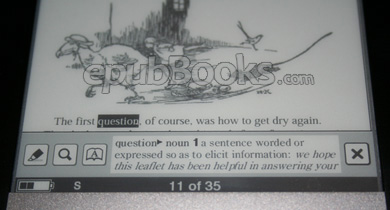
One of the best features of the Touch Edition is the new built-in dictionary - actually there are two; Oxford British English and Oxford American English - which are a fantastic addition. Usage is very easy; double-tapping a word shows a pop-up at the bottom of the screen with the definition and you can expand this out to show the full definition.
Battery Life
As with all E-Ink eReaders, battery life is very impressive. Only time will tell how expesive the touch screen and faster processor will be, but so far I’ve had to charge the reader a little more than I did with the PRS-505. Until I’ve spent a few more months with it I won’t know if that’s due to my experimentations or whether there is a real impact on power consumption.
Transfering Content to you Reader
You’ll need either a Windows or Mac computer to add content to your Reader (via USB) and this is done using either the Sony Reader Library or Adobe Digital Editions. I won’t go into details on how to use these as they are both very straight forward and come with their own help files. I will note however that if you wish to purchase commercial titles you will need to activate your eReader first (all commercial books for the Sony Readers use Adobe’s DRM), again, read the documentation.
Free and Commercial Content
There are many different stores now selling EPUB ebooks. We have a list on the Buy EPUB ebooks resource page, or use our site’s search bar, where we’ve included all the top online stores.
Here at epubBooks we also provide plenty of EPUB classics for free download, which you can access by selecting the ‘Free’ price option on the search pages.
Borrowing from your Local Library
For more information on how to get Library EPUB books, checkout our Blog post; Library Books & eReaders
Pros and Cons of the Sony Reader Touch Edition
Pros
- Enhanced user interface, making full use of the touch screen.
- Built-in British/American dictionary.
- Annotations/Memo/Handwriting/Drawing functionality.
- 5 font sizes and full page zoom function; including on PDF’s and images.
- Accelerated forward/backward page turns (over 3 pages per second).
- Comes with a soft-cover pouch instead of the heavy hard-cover, thus reducing weight.
Cons
- Screen background is a little darker than on the PRS-505.
- Touch screen makes the display slightly shiny.
- Now feels like you’re reading through the screen rather than with the text on it; due to the addition of touch surface.
- Needs a firm press of the finger for the touch to work (no problems when using stylus).
- Only comes with a soft-cover pouch, so less protection.
- No Wireless or Wi-Fi.
Conclusion
One of the strongest assets of a dedicated ebook reader, is the paper-like displays and long battery life that give an amazing reading experience. With the new Touch Edition, Sony has certainly added to that experience.
Annotations and the built-in dictionary are fantastic additions and if Sony can make it possible to add other dictionaries, such as translators, then this reader could be the first step in allowing students to realistically use a dedicated reader for study purposes.
With the Touch Edition, Sony has given us one of the best designed readers on the market and with the touch screen marrying perfectly with the new user interface, we have a couple features which really make this one of the most desirable ebook readers around, and should be a serious contender if you’re looking to upgrade or be buying an eReader for the first time.