
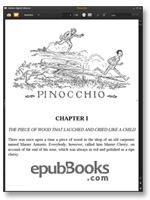
Adobe Digital Editions Review
Adobe Digital Editions (ADE) is a desktop computer ebook reader that can open both EPUB books and PDF files - with or without DRM (Digital Rights Management) protection. ADE is available for both Windows and Mac and is available in several languages including, English, French and German.
In late 2012 Adobe released v2.0 which had a huge array of improvements and changes. This version doesn’t yet support the full EPUB3 specification but this is expected to come in future releases.
To be able to read DRM enable ebooks you will need to authorize your computer. This is done when you first open the program. This authorization is not need to use ADE, but you will be restricted to non-DRM EPUBs. All the free classics here on epubBooks are DRM-free, so whichever ADE option you chose you’ll be able to read our books.
Reading EPUB ebooks with Adobe Digital Editions
Adding books to ADE could not be any mnore simple. Either use the Add to Library menu item, or just drag-and-drop onto the program itself. All your books are stored in the Library View and double clicking on a title opens it in the Reading View.
If you’ve authorized ADE and connected to the internet, then any DRM enabled book will automatically be confirmed and readable.
All the books I’ve tried so far have displayed without any problems and with several different font sizes available, you can select a text size that’s comfortable for you. Although the built in font style makes for a pleasant read, there’s no option for changing to an alternate style. This is unlikely to be an issue for most people.
A couple of useful features of ADE include the ability for full-text search and more interestingly, multiple bookmarks; a great feature that’ll be useful for anyone who likes making extensive notes on what they read.
Kobo, Sony, Cybook and other E-Ink eReaders
Along with the desktop application, Adobe has worked closely with many E-Ink reader manufacturers so that ADE is used as the default rendering engine for EPUB. eReaders such as the Kobo Reader, Bookeen Cybook and the Sony Reader all support Adobe DRM, so when you buy EPUBs from online stores such as Kobo, eBooks.com and Diesel-eBooks, they will work without issue.
Conclusion
This is a solid ebook reader with a pleasant interface that provides a good solution for reading EPUB ebooks on a personal computer. Because ADE also supports the DRM that’s used by most of the popular online ebook stores, it also provides a great introduction for anyone wanting to try an ebooks for the first time.
You can download the latest version of Adobe Digital Editions from Adobe.